
As you all know Silverlight 5 released with unrestricted access in InBrowser mode which gives full control to the Silverlight developers in the client machine. This post is to describe what are the changes you need to do at the server side as well as client side to leverage the trusted application feature.
Steps to setup Silverlight 5 application to have unrestricted access in IB using elevated trust mode
Ok.Now lets look at details of how we can create new SL project which access a file from c:\ in the In-Browse mode.First as usual create a Silverlight 5 Application. Then place a Button inside and wire the Click event handler.Write the below code in the handler to write a file to c:\
Giving Elevated trust to SL 5 application
Signing the xap
Next step is to sign the xap file with a certificate. Just goto Silverlight project properties and check the “Sign the Xap File” check box.If you don’t have any certificate just create a new one using the “Create Test Certificate” button.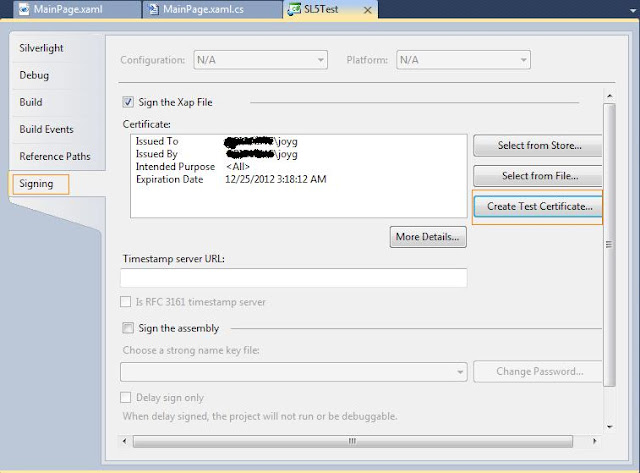
Disable the browser protected mode
The above changes are mainly for the server side. You need to do some at client side as well.The first one is to disable the protected mode in browser.Goto the internet options and disable it.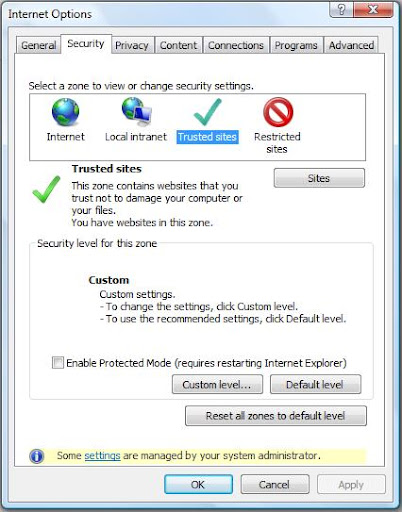
Change registry entry
As mentioned above just change the registry entry as it is.If you cant find the key just add a DWORD and set to 1. Still I am not sure how this step is carried out in other platforms such as MAC and Linux.
That’s it.Now run your application.It will create a file inside c:\ from in browser.Just uploaded the sample by removing the certificate as it give some information about my company laptop
Welcome to my general coding blog.
Most probably this will be my last post in this Silverlight technology blog. It’s a hard decision to stop this blog and use my general coding blog for all the programming related posts. Still I don’t know why I started separate blogs for each technology.May be my knowledge in SEO at that time lead me to have a new blog with technology name in the URL.Anyway changes are needed and I think this is the time to afford that. If possible I will post a last good bye post .Anyway you can start following me in my coding blog where my new Silverlight posts will come soon and it is.
Joymon v/s Code
- Server side
- Make the IB elevated from project properties
- Sign the xap using certificate.
- Client side
- Install the cert into “trusted publishers”
- Change the reg key “HKEY_LOCAL_MACHINE\SOFTWARE\Microsoft\Silverlight\AllowElevatedTrustAppsInBrowser” to 1
- The “Protected mode” of browser should be turned off for the zone.
Steps to setup Silverlight 5 application to have unrestricted access in IB using elevated trust mode
Ok.Now lets look at details of how we can create new SL project which access a file from c:\ in the In-Browse mode.First as usual create a Silverlight 5 Application. Then place a Button inside and wire the Click event handler.Write the below code in the handler to write a file to c:\
private void btnWriteToCDrive_Click ( object sender, RoutedEventArgs e )
{
    File.WriteAllText(@"c:\FromSL5.txt","This is written from Silverlight 5 web application in InBrowser mode");
}
Just to go to the Silverlight 5 project properties and in the Silverlight tab check the “Require elevated trust when running in-browser” check box.See the below screen shot for reference.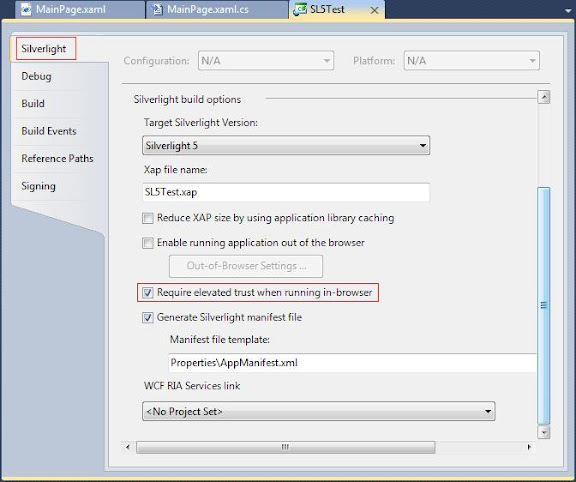
Signing the xap
Next step is to sign the xap file with a certificate. Just goto Silverlight project properties and check the “Sign the Xap File” check box.If you don’t have any certificate just create a new one using the “Create Test Certificate” button.
Disable the browser protected mode
The above changes are mainly for the server side. You need to do some at client side as well.The first one is to disable the protected mode in browser.Goto the internet options and disable it.
Change registry entry
As mentioned above just change the registry entry as it is.If you cant find the key just add a DWORD and set to 1. Still I am not sure how this step is carried out in other platforms such as MAC and Linux.
That’s it.Now run your application.It will create a file inside c:\ from in browser.Just uploaded the sample by removing the certificate as it give some information about my company laptop
Welcome to my general coding blog.
Most probably this will be my last post in this Silverlight technology blog. It’s a hard decision to stop this blog and use my general coding blog for all the programming related posts. Still I don’t know why I started separate blogs for each technology.May be my knowledge in SEO at that time lead me to have a new blog with technology name in the URL.Anyway changes are needed and I think this is the time to afford that. If possible I will post a last good bye post .Anyway you can start following me in my coding blog where my new Silverlight posts will come soon and it is.
Joymon v/s Code

